Quick Start: Create a PDF with the Native C API
Create a product-label PDF with a C++ program using the native C API, then change its product name and run it again. This Windows example uses the same layout and data fields as the .NET and Java Quick Starts:
- Load the supplied
ProductLabel.tfflayout. - Provide
ProductNameandArticleNumber. - Generate the PDF.
Check the Prerequisites
You need:
- 64-bit Windows;
- Visual Studio 2022 or its Build Tools, with the Desktop development with C++ workload, including the MSVC compiler and Windows SDK; and
- the TFORMer SDK for 64-bit Windows, including its native header, import library and runtime. See Windows installation.
The example uses C++17 for file handling and the native C functions for label generation. Use the header, import library and runtime from the same SDK installation. The supplied layout uses Arial.
For Linux integration, use Build on Linux; the commands below are for Windows.
Download and Open the Example
Download the complete native example (ZIP) — includes ProductLabel.cpp, the shared ProductLabel.tff layout and a README.1
- Extract the ZIP.
- Open x64 Native Tools Command Prompt for VS 2022.
- Enter
powershellin that prompt. - Change to the extracted folder with
cd 'C:\path\to\extracted-folder', replacing the example path with your folder.
This PowerShell inherits the x64 compiler environment; an ordinary PowerShell window may not find cl.
Keep the source and layout together; no layout creation or field-name replacement is required.
Build and Run
-
Set the SDK path. Change the value if your SDK is installed elsewhere.
$sdkBin = 'C:\Program Files\TEC-IT\TFORMer9 SDK\Bin' -
Compile the program using the SDK header and x64 import library.
cl /nologo /EHsc /std:c++17 /utf-8 /DWIN32 `
    "/I$sdkBin" .\ProductLabel.cpp /link `
    "/LIBPATH:$sdkBin" TFormer9x64.lib
if ($LASTEXITCODE -ne 0) { throw 'C++ compilation failed.' }
If compilation fails, fix the reported error and repeat this step before continuing. Do not run an executable left by an earlier build.
-
Make the SDK runtime available and select UTF-8 console output so that Unicode output paths display correctly.
$env:PATH = "$sdkBin;$env:PATH"
[Console]::OutputEncoding = [Text.UTF8Encoding]::new($false)
These settings apply to this dedicated PowerShell session until you close it; they do not change the permanent PATH. Keep the installed SDK runtime files together.
-
Run the program.
.\ProductLabel.exe
if ($LASTEXITCODE -ne 0) { throw 'Product-label generation failed.' }
If cl is not found or the linker reports an architecture mismatch, check that PowerShell was started from the x64 native-tools prompt. For a missing layout, check the current working directory. For a missing runtime DLL, check sdkBin and the SDK installation.
Check the Result
Open the PDF at the absolute path printed after Created PDF:. Each run saves ProductLabel.pdf in a new temporary folder, leaving previous output unchanged.
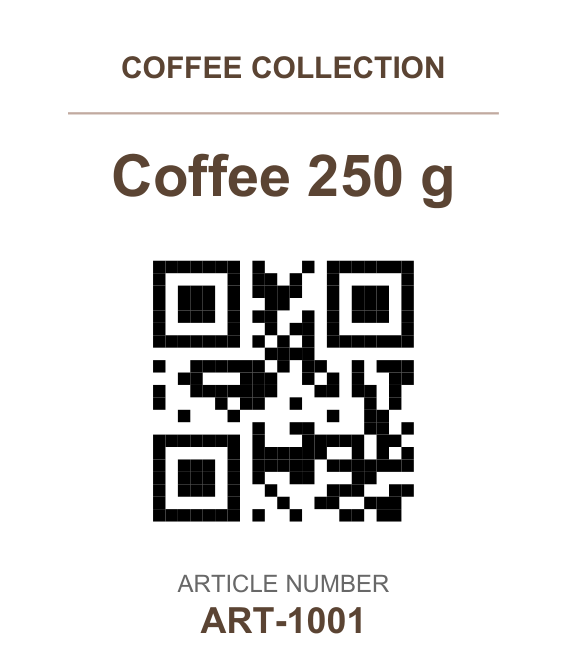
The label shows Coffee 250 g and ART-1001; its QR Code contains the same article number. This is an internal identifier, not an EAN, GTIN, or GS1 value.
Without license configuration, TFORMer may mark the PDF as evaluation output.
Change the Product Name
In ProductLabel.cpp, replace the value Coffee 250 g with another short product name. Keep the field name ProductName unchanged. Run the compile and start commands again, then open the new PDF.
Complete Program
The program reads ProductLabel.tff from the current working directory and supplies the two fields used by that layout. It checks SDK errors and releases the form handle after output, including on failure. Windows Unicode API calls support Unicode layout and output paths.
Show complete ProductLabel.cpp
Linked SDK names open the API reference.
#include <filesystem>
#include <iostream>
#include <random>
#include <stdexcept>
#include <string>

#define TECIT_DLLIMPORT
#include "TFormer.h"
#undef TECIT_DLLIMPORT

namespace fs = std::filesystem;

static void check(HTFORM form, ERRCODE result, const char* operation)
{
    if (result != ErrOk) {
        const char* message = TFormer_GetLastErrorDescription(form);
        throw std::runtime_error(std::string(operation) + " failed ("
            + std::to_string(result) + "): "
            + (message != nullptr ? message : "no error description"));
    }
}

int main()
{
    HTFORM form = nullptr;
    fs::path output;
    int result = 1;
    try {
        const fs::path layout = fs::absolute(L"ProductLabel.tff");
        if (!fs::is_regular_file(layout)) {
            throw std::runtime_error(
                "ProductLabel.tff not found. "
                "Run from the extracted sample folder.");
        }

        std::random_device random;
        const fs::path folder = fs::temp_directory_path()
            / ("TFORMerProductLabel-" + std::to_string(random())
                + "-" + std::to_string(random()));
        if (!fs::create_directory(folder)) {
            throw std::runtime_error(
                "Could not create a unique output folder.");
        }
        output = fs::absolute(folder / L"ProductLabel.pdf");

        form = TFormer_Init(nullptr);
        if (form == nullptr) {
            throw std::runtime_error("TFormer_Init failed.");
        }
        check(form, TFormer_SetRepositoryNameW(form, layout.c_str()),
            "TFormer_SetRepositoryNameW");

        // These field names match the supplied ProductLabel.tff layout.
        check(form, TFormer_NewRecord(form), "TFormer_NewRecord");
        check(form, TFormer_SetVarValueW(
            form, L"ProductName", L"Coffee 250 g"),
            "TFormer_SetVarValueW(ProductName)");
        check(form, TFormer_SetVarValueW(form, L"ArticleNumber", L"ART-1001"),
            "TFormer_SetVarValueW(ArticleNumber)");

        check(form, TFormer_SetPrinterType(form, ePrinterType_PDFFile),
            "TFormer_SetPrinterType");
        check(form, TFormer_SetOutputNameW(form, output.c_str()),
            "TFormer_SetOutputNameW");
        check(form, TFormer_Print(form), "TFormer_Print");

        if (!fs::is_regular_file(output) || fs::file_size(output) == 0) {
            throw std::runtime_error(
                "TFORMer did not create a non-empty PDF.");
        }
        result = 0;
    } catch (const std::exception& exception) {
        std::cerr << "Cannot create product label: "
            << exception.what() << '\n';
    }

    if (form != nullptr) {
        const ERRCODE exitResult = TFormer_Exit(form);
        if (exitResult != ErrOk) {
            std::cerr << "TFormer_Exit failed: " << exitResult << '\n';
            result = 1;
        }
    }
    if (result == 0) {
        std::cout << "Created PDF: " << output.u8string() << '\n';
    }
    return result;
}
Continue in the API Guide
Continue with the Native C API guide for build setup, the general workflow and additional examples.
- Use your own layout and work with data.
- Print to a Windows printer or generate PDF output in memory.
- Apply a license and deploy on Windows.
-
When reading an offline PDF copy, keep its accompanying
downloadsfolder beside it so that the example link works. ↩